Costs
Identity and access: the moments where control quietly fails
Identity and access as five moments: named accounts, privilege that creeps, the weak recovery path, shared logins, and an offboarding that runs fast.
Most small businesses have no network perimeter left to defend. The work happens in a browser, on a laptop in somebody's kitchen, against services run by other companies. What is left in the middle is a list of accounts, and that list is the thing an intruder is actually after.
So it helps to stop thinking about identity as a settings screen and start thinking about it as a lifecycle with five moments: an account is created, granted access, used, changed, and eventually removed. Nearly every failure worth caring about happens at one of those five points, and each has a fix that costs time rather than money.
What to take away
- The decisions made here are the ones you live with, so a short standard is worth writing down.
- "Give people only the access they need" is correct and almost never survives contact with a working week.
- Every business has logins that genuinely cannot be split into one per person: a supplier portal that sells a single seat, a legacy system with one license, a social media account, a router.
- Offboarding is usually written as a list of accounts to close.
Moment one: the account is created
The decisions made here are the ones you live with, so a short standard is worth writing down.
Account creation standards
- Named account for every person
- Separate admin account from daily work
- Keep one break-glass administrator account
- Hardware key or long passphrase
- Test emergency access twice a year
Every person gets their own named account. This sounds obvious until you meet the reception login, the warehouse tablet, and the shared address that three people check. A named account is what makes every later control possible: you cannot revoke, audit, or investigate a login that belongs to nobody in particular.
Administrator work gets a separate account from daily work. The same human can hold both, but the account that reads mail and opens attachments should not be the account that can delete the tenant. This single separation removes an enormous amount of blast radius for the cost of a second sign-in.
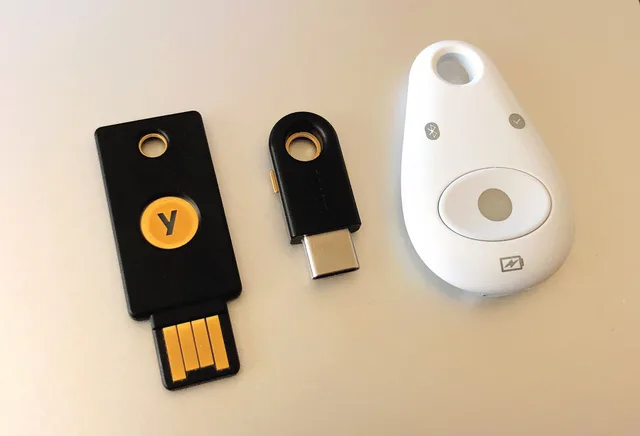
Keep at least one break-glass administrator account. It is not tied to an individual, not enrolled in the daily single sign-on path, protected with a hardware key or a very long passphrase stored somewhere physical, and never used for routine work.
Businesses lose access to their own systems more often than they get hacked out of them: the sole administrator leaves, loses the phone, or is on a flight. Set up the emergency door while nothing is on fire, and check once or twice a year that it still opens.
Moment two: access is granted, and least privilege quietly fails
"Give people only the access they need" is correct and almost never survives contact with a working week.
Prevent privilege creep
- Start narrow deliberately, let people ask
- Attach access to the role, not the person
- Review the short list, not the long one
It fails for structural reasons, not because anyone is careless. Nobody knows in advance what a new hire will need, so someone copies an existing employee's permissions, and every quirk of that history is inherited. Requests arrive when work is blocked, so the fastest safe-looking answer is a broader role than required.
The person who could evaluate the request is the person the requester is waiting on. And nothing ever prompts anyone to take access away, because removal has no deadline and no complainant.
The result is accumulation. After a couple of years the average account holds the union of every role its owner has ever occupied, and any one of those accounts is now a substantial prize.
Three practices help more than a policy document:
Moment two: least privilege
- Start narrow deliberately, and let people ask.A new account with too little access produces a request in an hour. A new account with too much produces nothing at all, forever.
- Attach access to the role, not the person.Define what "bookkeeping" or "site supervisor" gets. When somebody moves between roles, the old set comes off as the new set goes on: the internal move is the case everyone forgets, and it is where accumulation actually happens.
- Review the short list, not the long one.A full access review across every system is a project nobody finishes. Reviewing who holds administrator rights, who can approve payments, and who can reach customer data takes half an hour a quarter and catches most of what matters.
Moment three: the account is used, and the recovery path becomes the weak link
You can require a long password, enforce a strong second factor, and still be defeated by the process that exists for when someone loses their phone.
Account recovery must let a genuine, locked-out user back in without the credentials that normally prove identity. Whatever remains is the account's real strength.
That leftover is usually softer: a code sent to a personal mailbox, a question whose answer is on a public profile, a backup phone number, or a support agent who can be persuaded.
That gives you a short and unusually productive list of things to check:
Recovery path checks
- Protect the mailbox receiving password resets
- Audit recovery contacts on critical accounts
- Treat security answers as passwords
- Print recovery codes, store physically
- Know vendor support requirements
Phishing-resistant second factors matter here too, and the reasoning is set out in the guide to phishing defense.
Moment four: things change, and shared logins have to be dealt with honestly
Every business has logins that genuinely cannot be split into one per person: a supplier portal that sells a single seat, a legacy system with one license, a social media account, a router. Pretending otherwise produces a policy everybody ignores.
Handle shared logins
- Put shared credentials in a shared vault
- Assign a named owner for rotation
- Record who currently has access
- Convert to individual accounts where possible
- Give machine accounts an owner and purpose
- Review connected third-party applications
Deal with them explicitly instead.
Put every shared credential into a password manager with a shared vault. Access is then granted and withdrawn per person, without the password circulating in chat messages, spreadsheets, or a note taped to a monitor. Assign each shared login a named owner who is responsible for rotating it.
Record which people currently have access, because that list is what you will need on a leaving day. Where the service supports it, convert the shared login into individual accounts even if it costs another seat; a second license is cheap next to an untraceable action.
Machine and service accounts need the same discipline for a different reason. They hold long-lived keys, they rarely have MFA, nobody watches them, and they outlive the projects that created them. Give each one an owner, write down what it is for, and delete it when the integration is retired.
The same applies to third-party applications connected to your mail or file storage. An application someone approved once holds standing access that survives password changes and is invisible unless you go looking. Review the connected-application list on your main platforms periodically and remove anything nobody can account for. There is more on this in cloud security.
Moment five: someone leaves, and speed is the whole control
Offboarding is usually written as a list of accounts to close. That list is necessary, but the order is wrong, because closing accounts alphabetically over a week leaves the important ones open on the day that matters.
Offboarding order
- Revoke active sessions everywhere
- Disable mailbox and primary account
- Remove from admin groups and payment approvers
- Reclaim second factor and hardware key
- Rotate shared credentials they accessed
- Reassign files, calendars, service accounts
- Check mailbox forwarding rules
Do the following first, on the day access ends:
- Revoke active sessions everywhere, not only the password. A signed-in browser or mobile app continues to work after the password changes until sessions are explicitly invalidated. This is the step most commonly missed, and it is the one that decides whether the departure is clean.
- Disable rather than delete the mailbox and the primary account.Deletion destroys evidence and can destroy files. Disable, keep, and delete on a schedule you set deliberately.
- Remove them from the administrator groups and the payment approversbefore anything else on the list.
- Reclaim the second factor and any hardware key, and remove their phone number and personal address from recovery contacts across your services.
- Rotate the shared credentials they had access tothis is what the shared-vault access list is for, and it is why keeping that list is worth the effort.
- Reassign ownership of files, calendars, and any service accounts they owned, then check for automated jobs and integrations that run under their name and will silently stop.
- Check for forwarding ruleson the mailbox before you disable it.
Two details make the difference between a checklist and a working process. Someone must own it: usually whoever runs payroll, because they always know first. And it must run identically for a friendly resignation and an abrupt exit, because a process that only gets executed properly when people are worried is a process that mostly does not get executed.
Where to start if none of this exists
Do it in this order, and stop reading between steps to actually do them. First: MFA on the mail tenant; a password manager rolled out to everyone; separate administrator accounts. Then: a break-glass account with printed recovery codes; shared logins moved into a shared vault with a named owner each; a written offboarding sequence with session revocation at the top.
Where to start
- MFA on the mail tenant
- Password manager for everyone
- Separate administrator accounts
- Break-glass account with printed codes
- Shared logins in a vault with owner
- Written offboarding with session revocation
Single sign-on is worth adding when the number of applications makes it cheaper than the alternative, because it centralises both the enforcement and the offboarding. It is not the first purchase. It is the one that pays off after the basics above are in place.
The United States Federal Trade Commission's data security guidance for businesses covers access control at a general level and costs nothing to read. Whether any particular access rule is required of you depends on your sector, your contracts, and your jurisdiction, which is a question for your own legal and insurance advisers.
Common questions
Where do we put multi-factor authentication first?
On the mailbox that receives password resets, then on anything that can move money, then on whoever administers your systems. That order follows the recovery path rather than the org chart, which is why it differs from most published advice.
A service we depend on does not support a second factor. What then?
Treat the password as the whole control: long, unique, in the password manager, and known to as few people as possible. Ask the supplier in writing when they will offer one, and record the gap somewhere you will see it again, because the answer sometimes changes.
Should the password manager be a business account or can people use their own?
A business account, with shared vaults the company controls. Personal accounts leave with the person, and the credentials in them are frequently business credentials nobody else can reach.
What happens if the only administrator leaves suddenly?
That is the case the break-glass account exists for, and it is worth testing once a year while nothing is wrong. Businesses lose access to their own systems more often than they are broken into, and the sequence in security foundations treats the emergency door as part of the setup rather than as an extra.
How does any of this connect to payment fraud?
A mailbox reached with valid credentials is the usual starting point. The verification rule described in business email compromise stops the money leaving even when the account work has already failed.
The United States Cybersecurity and Infrastructure Security Agency's note on multi-factor authentication is a short, plain statement. It explains why the first control on this page is worth doing today.
In this guide
- What questions should identity and access software have to answer?Identity and access software judged by five questions it must answer about your own accounts, plus the terms you will meet in quotes, what it will never cover, and whether central control is worth the cost.
- Identity and access features that remove a decision, not just inform oneIdentity and access features sorted by whether they remove a decision or merely inform one, what each costs in attention, and which to switch on first.
- A working brief on identity and access alternativesIdentity and access alternatives when the ideal is out of reach: defensible second-best choices, what each one gives up, and the check that recovers it.
- Do identity and access reviews actually work by resource, or by person?Identity and access reviews scoped to four short lists: who signs them, what to do with unclaimed accounts, and using the same test to judge a product.
- Identity and access migration: finding the access nobody listedIdentity and access migration breaks most where access sits outside the directory. Seven hiding places, how to find each, and who to ask before cutover.
- Four ways to arrange identity and access compared: local accounts, a password manager, SSO, and provisioningFour ways to arrange identity and access compared: local accounts, a password manager, SSO, and provisioning. What each fixes, leaves open, and what changing takes.